
Voxist: read your voicemail
VoxistProductivity
4.23.19K Reviews
- Version
- 1.100.2
- Installs
- 100.00K
- Age Rating
- Everyone
Screenshots
Our Review of Voxist: read your voicemail
 Analysis by Appyee
I have always found voicemail more useful in theory than in daily life. A missed call arrives, I notice the notification, and then I postpone listening because I am in a meeting, walking through a noisy station, or simply not in the mood for a long audio message. Voxist: read your voicemail takes a practical approach to that problem by turning voicemail into something I can scan before deciding whether it deserves my immediate attention. It is a free productivity app from Voxist, with optional in-app purchases ranging from $2.49 to $14.99 per item.
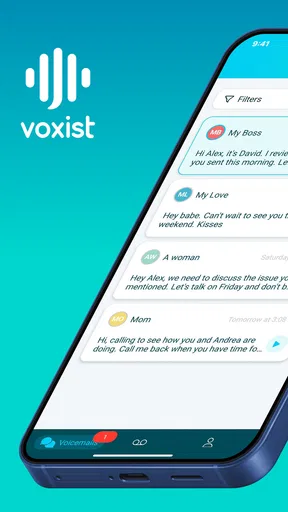
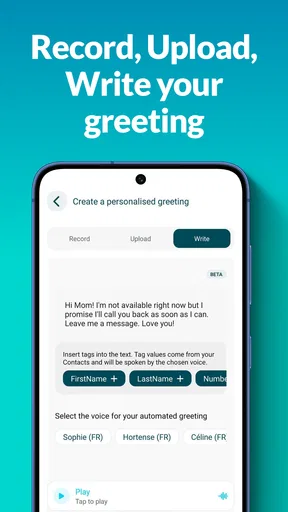
After using it as a visual voicemail companion, I would describe it as a tool for people who want more control over incoming messages rather than another general-purpose communication app. Its central idea is straightforward: voicemail can be presented as text, while customized greetings help callers receive a more personal response when I cannot answer. The experience is most valuable when I treat it as part of a repeatable call-handling routine, not as a replacement for every phone feature.
How the everyday voicemail workflow feels
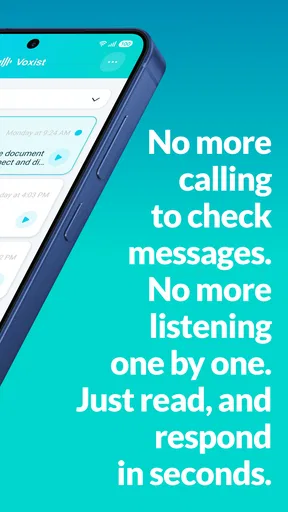
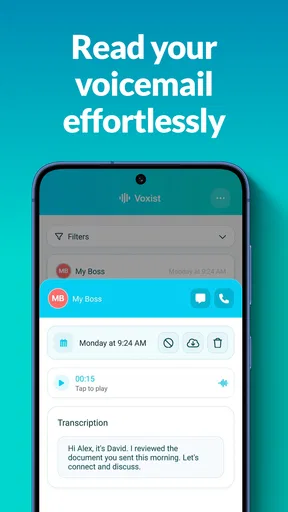
The basic routine is easy to understand. A call goes unanswered, the caller leaves a message, and I can check the voicemail in a visual format instead of opening each recording and listening from beginning to end. That small change makes a noticeable difference when I am sorting several missed calls. I can quickly identify whether a message is urgent, whether it needs a callback, or whether it is the kind of vague sales call that can wait.
This is where the app fits naturally into the productivity category. It does not try to become my full phone replacement. Instead, it gives missed calls a more manageable inbox-like treatment. I found that distinction important: the app is most useful after a call has already reached voicemail, when the problem is not answering but understanding what happened next.
A realistic example is a busy workday with calls arriving while I am presenting or commuting. With ordinary voicemail, I might tap through several recordings, remember only fragments, and replay one because I missed a name or number. With a visual transcript available, I can first scan the message and decide which caller deserves a response. For a short message, reading is faster; for a complicated explanation, I can still use the audio as the more reliable source.
That last point matters. Transcription is a convenience, not a reason to stop checking the original recording when details are important. Names, addresses, technical terms, accents, background noise, and phone numbers can all make any automatic text conversion less dependable. My preferred habit is to use the transcript for triage, then listen to the recording before acting on anything sensitive or ambiguous.
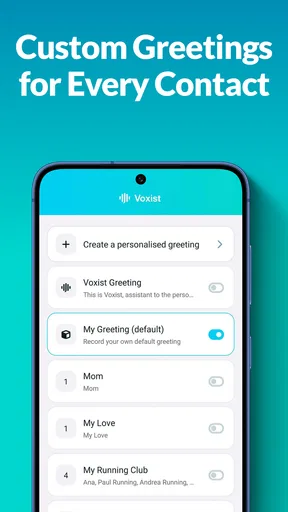
The customized greeting feature adds another useful layer. A default greeting is fine for casual personal calls, but it can sound impersonal when the number is used for work, appointments, or side projects. A greeting that clearly says I cannot answer and invites the caller to leave the relevant information makes the resulting voicemail easier to process. I would keep it short and specific rather than trying to explain my entire schedule.
One practical trick is to write the greeting around the information I actually need. If missed calls usually concern appointments, I can ask callers to include their name, reason for calling, and a suitable callback time. That does not guarantee a complete message, but it gives the caller a useful structure and makes the transcript easier to scan later. The app becomes more effective when the greeting supports the workflow instead of merely announcing that I am unavailable.
What I would check before relying on it
Before making Voxist the main way I handle missed calls, I would test it with several harmless messages. I would call from another phone, leave a short message, speak at a normal pace, and then try again with a name or number. This simple trial shows how the visual presentation works in my own calling environment and helps me learn when the transcript is clear enough to trust.
I would also check how the app behaves with callers who leave very short messages. A message such as “Call me back” provides little context, whether it is displayed as text or played as audio. That is not a flaw unique to Voxist, but it affects how much value I get from visual voicemail. The app can organize information; it cannot create information that the caller never supplied.
The greeting settings deserve attention because they shape the quality of every later message. I would listen to my greeting as a caller would, checking whether it sounds clear, whether the request is easy to understand, and whether it accidentally encourages people to leave unnecessary personal details. A concise greeting is easier to follow and keeps the resulting voicemail focused.
It is also worth considering the difference between personal and professional use. For a personal number, a friendly general greeting may be enough. For a work number, I would use wording that sets expectations without promising a response time I cannot maintain. If I receive calls from different groups, I would think carefully about whether one greeting can serve everyone or whether the app is better suited to a single, consistent calling identity.
The app is free to start, which lowers the barrier to trying the workflow. Optional purchases are present, so I would review what is included before building a routine around a paid capability. I prefer to test the core experience first, confirm that visual voicemail fits my habits, and only then decide whether an upgraded option is worthwhile. That approach avoids paying for convenience before I know that I will use it regularly.
Compatibility is another sensible checkpoint. Voxist supports Android devices beginning with version 7.0, and the current version is 1.100.2. Those details make it accessible to many Android users, but the practical question is still whether it works smoothly with my phone setup and calling arrangement. I would not assume that an app handling voicemail will behave identically on every device or with every mobile service.
Small habits that make visual voicemail faster
The biggest improvement comes from separating urgent messages from messages that merely need filing in my memory. I like to scan first, listen second, and respond third. That order prevents me from spending equal time on every missed call. A transcript can reveal that a message is a routine reminder, while a recording with unclear wording tells me to slow down and listen carefully.
I would also avoid treating the voicemail screen as a place to store every decision indefinitely. After reading or listening, I can decide on one next action: call back, note the information elsewhere, wait, or ignore an obvious nuisance message. This habit keeps the visual inbox from becoming another neglected queue. The app is most helpful when it supports a decision rather than becoming another place where unfinished tasks accumulate.
For recurring callers, the transcript can make patterns easier to notice. If someone repeatedly leaves incomplete messages, I can adjust my greeting to ask for the missing detail. If a particular type of call is usually urgent, I can recognize its wording more quickly. These are not flashy functions; they are workflow benefits that appear after using the same setup consistently.
Another useful pattern is listening selectively. I would not rely on text alone for anything involving payment instructions, access codes, legal matters, medical information, or a precise address. In those cases, the transcript helps me locate the relevant message, but the recording remains the safer reference. This balance is one of the most important ways to use the app responsibly: visual voicemail improves speed, while audio preserves the original context.
I also find that a customized greeting works best when reviewed occasionally. My availability changes, and a greeting that made sense during a busy period can become misleading later. I would listen to it every so often and remove wording that sounds outdated. Even without changing the greeting frequently, checking it prevents the awkward situation where callers receive instructions I no longer follow.
For people who receive many calls, a useful routine is to process voicemail at set moments rather than reacting to every notification. I might check messages after leaving work, after a commute, or between tasks that allow concentration. The visual format makes that batching easier because I can scan several messages quickly, then listen only to the ones that require detail. This is more efficient than repeatedly interrupting the day for every missed call.
Where the app is strong and where it needs caution
Voxist is strongest when the main problem is friction. Traditional voicemail often forces me into a linear process: call in, enter a code, listen, replay, and remember. A visual interface is easier to approach because it gives me an overview. I can see which messages exist and choose where to begin instead of treating the inbox as one long audio session.
It is also a good fit for people who cannot always listen privately. In a quiet office, public transport, or shared home, reading a short message may be more practical than playing audio aloud. I still need to consider the privacy of the text on screen, but the option to review voicemail silently is genuinely useful. It changes when and where I can process missed calls.
The limitation is that text can create false confidence. A clean-looking transcript may appear authoritative even when a word has been misunderstood. I would be especially cautious with names, numbers, and instructions. If a decision could cause embarrassment, lost time, or financial trouble, I would verify it against the audio or contact the caller directly.
Another trade-off is that the app does not remove the need for good voicemail etiquette. If callers leave unclear messages, the visual display will still be unclear. If my greeting is too long, callers may hang up before leaving anything useful. The quality of the overall system depends on both sides of the call, so I see the app as an organizer and interpreter rather than a complete communication solution.
People who rarely receive voicemail may not gain much from installing it. If almost every call is answered, sent to a messaging app, or handled through a standard carrier voicemail system, a separate visual layer may add more maintenance than value. Likewise, anyone who wants a full business phone platform with team routing, shared inboxes, or broad call-center controls should look elsewhere. Voxist makes sense for personal or individual voicemail management, not for replacing an entire communications operation.
Compared with ordinary carrier voicemail, the advantage is immediate visibility and less dependence on sequential audio playback. Compared with a general messaging app, its purpose is narrower but more relevant to missed phone calls. A messaging app is better when the other person can simply text; Voxist is useful when the caller chooses the phone network and leaves a voicemail instead. That distinction explains why it can feel essential to one person and unnecessary to another.
Who should use it and who should pass
I would recommend it to anyone whose day contains frequent unknown calls, appointment calls, client calls, or messages that arrive at inconvenient times. It is particularly suitable for people who want to screen missed calls without immediately committing to a callback. The free entry point makes experimentation easy, and the Everyone content rating means it is presented as suitable for a broad audience.
I would also consider it for a personal number that has gradually become a mixture of family, work, delivery, and service calls. In that situation, a visual list can reduce the mental effort of remembering why each person called. The customized greeting can add a little order by asking callers to leave the information needed for a useful follow-up.
I would skip it if I am uncomfortable reviewing sensitive voicemail in text form, if my calling setup does not cooperate with visual voicemail, or if I already have a carrier feature that provides the same experience in a way I prefer. I would also avoid making it my only record for important instructions. Keeping the original audio available and confirming critical information is a better practice than assuming every transcript is perfect.
The app has built a respectable audience, with an average rating of 4.2 from around 11 thousand ratings and more than 100 thousand installs. I see those figures as a sign that the basic idea resonates with many users, but not as a guarantee that it will suit every phone, carrier, or calling pattern. Voicemail is closely tied to how a person receives calls, so personal testing still matters more than popularity.
My verdict after building a repeatable routine
Voxist is most convincing when I use it as a voicemail triage tool, not as a magical replacement for listening. The combination of visual reading and customized greetings makes missed calls easier to manage, especially during busy periods when audio playback is inconvenient. Its real advantage grows through habits: a clear greeting, a quick scan, selective listening, and a firm decision about what to do with each message.
I appreciate that the app addresses a specific annoyance instead of trying to become an oversized productivity suite. The experience is focused, and that focus makes it easy to understand. At the same time, the transcription workflow requires judgment, and optional purchases mean I would test the free experience before spending anything. The right question is not whether visual voicemail sounds useful, but whether I receive enough voicemail to benefit from processing it differently.
For me, the answer is yes when calls regularly interrupt my day or arrive from people who do not text. I can read first, listen when necessary, and return calls with better context. If my voicemail inbox is usually empty, the standard phone tools are probably enough. But for anyone who wants a calmer, more deliberate way to handle missed calls, Voxist: read your voicemail is a practical productivity app that earns its place through everyday efficiency rather than unnecessary complexity.
Verdict
Strengths of Voxist: read your voicemail
- Turns voicemail messages into readable text for quick scanning.
- Keeps voicemail management separate from your phone’s default inbox.
- Useful when listening to messages is inconvenient or impossible.
- Can help organize important messages for later reference.
- Supports a more efficient workflow for busy professionals.
Limitations of Voxist: read your voicemail
- Transcription accuracy may drop with accents, noise, or unclear speech.
- Some features may require a paid subscription or premium plan.
- Availability and features can vary by country and mobile carrier.
- Requires access to voicemail and may need careful permission setup.
- Sensitive voicemail content is processed digitally, raising privacy concerns.
Similar Picks in This Category
View All
Google Calendar
Google LLC4.6

Google Drive
Google LLC4.3

Google Assistant
Google LLC3.9

Microsoft OneDrive
Microsoft Corporation4.6

Samsung Calendar
Samsung Electronics Co., Ltd.4.1

Microsoft OneNote: Save Notes
Microsoft Corporation4.6
Frequently Asked Questions
What is Voxist: read your voicemail?
Voxist is a visual voicemail app that converts voicemail messages into written text, allowing you to read them instead of listening to every recording. After setup, it can organize messages in one place and may provide notifications when new voicemails arrive. It is designed for people who want to scan, search, and manage voicemail more conveniently, especially when listening is not practical.
How accurate is Voxist’s voicemail transcription?
Voxist generally produces useful transcriptions, but accuracy can vary depending on the caller’s accent, speaking speed, background noise, audio quality, and the complexity of the conversation. Clear messages are usually easier to understand, while names, phone numbers, technical terms, and multiple speakers may be transcribed incorrectly. It is best to check the original audio before relying on important details.
Does Voxist work with every mobile carrier and phone number?
Voxist’s availability and features can depend on your country, mobile carrier, phone type, and voicemail configuration. During setup, the app may ask you to activate call forwarding or replace your existing voicemail service, and some carriers may not support every option. Before downloading, check Voxist’s current compatibility information and confirm that your carrier allows the required voicemail settings.
Is Voxist free to use, or does it require a subscription?
Voxist may offer a free version or trial with limits on features, transcription volume, storage, or voicemail management, while advanced tools can require a paid plan. Pricing and included benefits may vary by region and can change over time. Review the subscription screen carefully before confirming, especially the renewal terms, trial duration, and cancellation process through the App Store or Google Play.
Is my voicemail data private and secure with Voxist?
Because Voxist needs access to voicemail recordings and transcriptions, privacy is an important consideration before installation. The app’s permissions, privacy policy, and data-handling practices explain how information may be processed, stored, or shared to provide the service. Avoid treating transcriptions as perfectly confidential without reviewing those details, and use the app’s account, deletion, and notification controls to manage your information responsibly.
